Skip to content

Ergonomic keyboards, ranked by how much they change

These four run from the biggest change of hand position to the smallest: a curved split keyboard with negative tilt and a third-party ergonomics certification, two fixed split shapes, and a one-piece keyboard built for durability. None of them separates into two halves or offers tenting.

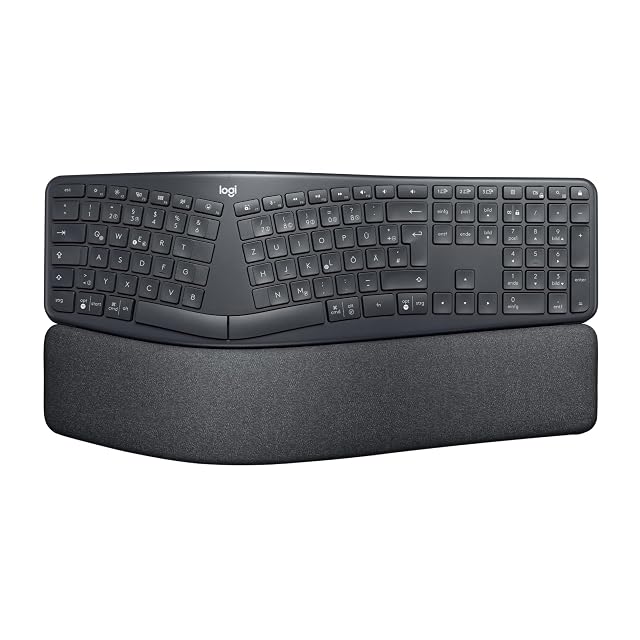
Logitech’s ERGO K860 leads this guide as the only keyboard here independently certified by an ergonomics organization, with adjustable negative tilt and a curved, padded design.

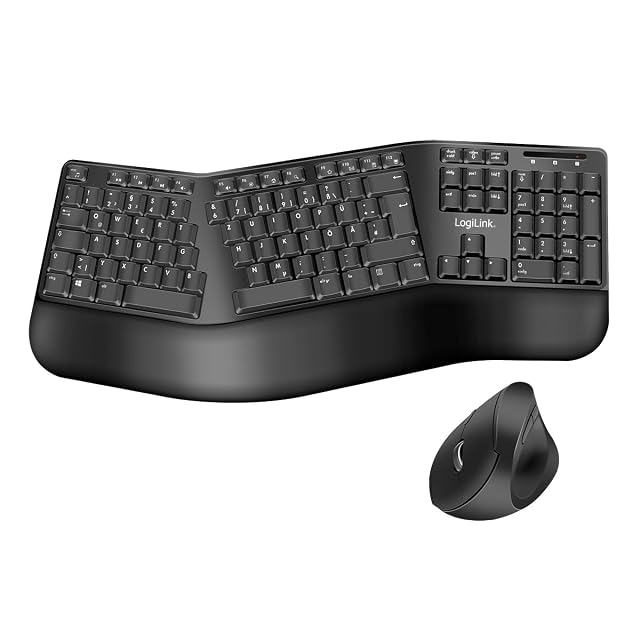
LogiLink’s wireless keyboard-and-mouse set is the practical pick for a new desk setup — a matched split keyboard and adjustable-DPI mouse on one 2.4GHz receiver — once you have checked the layout, German QWERTZ on the listing we read.

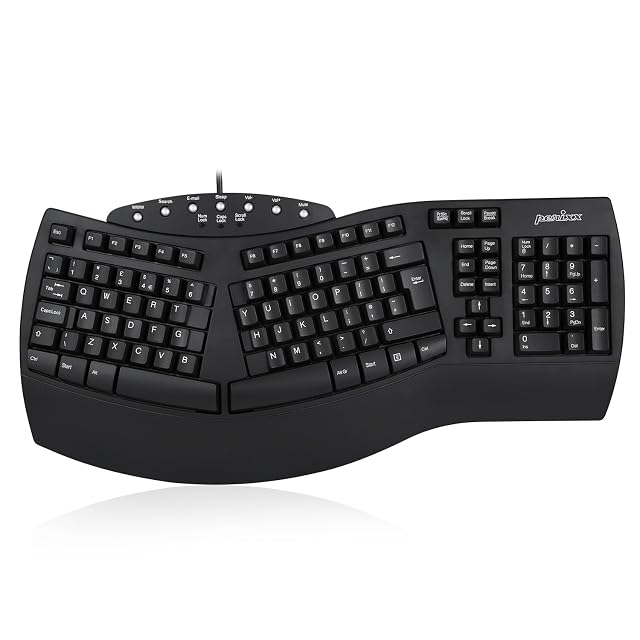
Perixx is the accessible first step into split typing: a fixed 3D shape and integrated wrist rest, wired, and the only published size here (485 mm, 19.1 in wide) — in a British QWERTY layout on the listing we read.

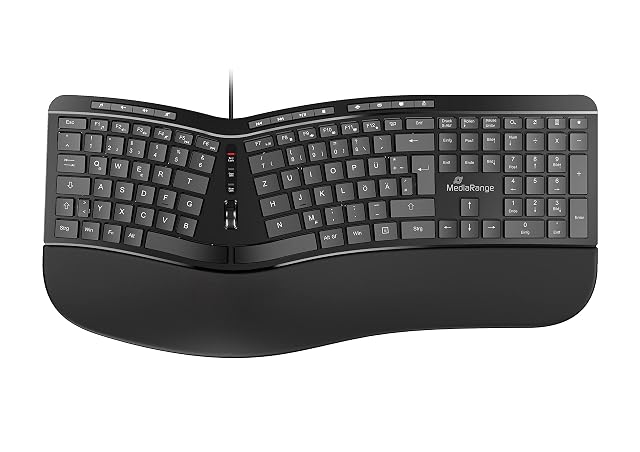
MediaRange skips the split layout entirely in favor of durability — a splash-resistant build rated for over 10 million keystrokes, better suited to a shared or high-use desk than a genuine ergonomic upgrade, and German QWERTZ only.

Before ordering any of the four, check the layout: none of the listings we read states a US layout.

Which one fits your setup?

You type all day
A keyboard is the tool your hands touch most, and layout affects wrist angle more than any accessory.
You want a gentle change
A one-piece curved keyboard is a smaller adjustment than a split one, and takes far less relearning.
You want the biggest change in wrist angle
A curved split keyboard like the Logitech K860, with negative tilt, changes the hand position most here — and takes the longest to get used to.
You have existing wrist pain
That is a matter for a healthcare professional; a keyboard supports a change of setup, it does not treat anything.

Picking by how you work

All-day typing

Where layout and key feel matter most, because the same movement is repeated thousands of times.

Occasional typing

Where an ergonomic keyboard is a smaller gain, and where the relearning cost may not be worth it.

Shared desks

Where a conventional layout is easier for everyone, and an unusual one causes friction.

Traveling

Where split and curved keyboards become awkward, and a compact conventional board wins.

The points that matter after a month

Split, curved or conventional
A split keyboard lets each hand sit at shoulder width; a curved one is a milder version of the same idea; a conventional one asks nothing of you and changes nothing.
Tenting and negative tilt
Tenting raises the middle so your forearms rotate less; none of these four offers it. Negative tilt slopes the keyboard away from you — the Logitech K860 sets 0°, −4° or −7°.
Key switch feel
How much force and travel each keypress needs. It is personal, it is what you will notice daily, and it cannot be judged from a description.
Layout compromises
Ergonomic boards often move keys you use. Check where the ones you rely on have gone before committing.
How long relearning takes
A curved or split keyboard takes time to adapt to. That is normal and worth knowing before you decide the keyboard is wrong.

Which figure for which situation

Your situationThe keyboardThe cost
All-day typingSplit or curvedA period of relearning
Occasional typingConventionalNone
Wanting a gentle changeCurved one-pieceLess adjustment
TravelingCompact conventionalNo ergonomic benefit

The usual missteps

Giving up in the first week
Typing usually slows at first on a curved or split keyboard and then recovers. Judging it after a few days is judging the adaptation, not the keyboard.
Using the flip-out feet
The traditional feet tilt the keyboard towards you, which extends the wrist. Common ergonomic guidance is a flat or slightly negative angle instead.
Resting wrists while typing
A wrist rest is for pauses, not for typing on. Anchoring the wrists makes the fingers stretch instead of the hands moving.
Expecting a keyboard to solve pain
Setup changes can help; persistent pain is a matter for a healthcare professional. A keyboard is not a treatment.

By the person using it

The all-day typist
A split or curved board, accepting the relearning period, plus attention to desk and chair height.
The cautious
A curved one-piece keyboard, which is a much smaller change and often enough.
The occasional user
A conventional keyboard at the right height. Position matters more than the keyboard at low volumes of typing.

Wear, warranty and working life

Keyboards accumulate dust, crumbs and skin oils, and that is what makes keys stick and stop registering. On a wired keyboard, the cable where it leaves the case is the point that flexes most.

  • Turn it over and shake it out regularly; that alone prevents most sticking keys.
  • Wipe keycaps rather than soaking them; liquid under keys is the classic failure.
  • Check the cable where it leaves the case on the wired Perixx and MediaRange; it flexes most there.
  • Replace worn keycaps where possible rather than the whole keyboard.

Safety

This is about repetitive strain rather than acute hazards.

  • Take short breaks and vary your position through the day.
  • Set the desk and chair so forearms are roughly level, which matters more than the keyboard.
  • Stop and change what you are doing if you notice discomfort rather than working through it.
  • See a healthcare professional about persistent pain, numbness or tingling; equipment is not a diagnosis.

The picks, and the grounds for them

  1. Logitech wireless curved split keyboard with negative tilt

    Curved split · 0°, -4° or -7° tilt · USB receiver or Bluetooth · US Ergonomics certified

    A wireless curved split keyboard with concave keys, a padded wrist rest and feet that set 0°, -4° or -7° of negative tilt — the only keyboard in this hub certified by an ergonomics organization.

    Best for: Someone committing to a curved split layout who also works standing, where negative tilt matters.
    8.6/10

  2. LogiLink wireless ergonomic keyboard and mouse set

    Wireless 2.4 GHz set · split keyboard + 800–1600 DPI mouse · German QWERTZ

    A wireless split keyboard and right-handed mouse sold as one set on a single 2.4 GHz nano receiver, with a palm rest and number pad — in the German QWERTZ layout on the listing we read.

    Best for: Setting up a new desk with a matched wireless keyboard and mouse, once you have confirmed the layout.

    7.8/10

  3. Perixx wired split ergonomic keyboard

    Wired · fixed split 3D shape · integrated wrist rest · UK QWERTY · 485 mm wide

    A wired, full-size split keyboard with a fixed 3D shape, an integrated wrist rest and 7 multimedia keys, 485 mm (19.1 in) wide — in the British QWERTY layout on the listing we read.

    Best for: A first split keyboard, wired, for someone who wants to try the layout before anything adjustable.

    7.2/10

What buyers ask us first

Wireless or wired?

Wireless clears the desk: the Logitech connects by receiver or Bluetooth, the LogiLink by one receiver shared with its mouse. The Perixx and MediaRange are wired, with nothing to charge. The shape matters more than the connection.

Is a split keyboard worth learning?

For all-day typing, many people find it worth several weeks of slower typing. For occasional use the adaptation cost is harder to justify.

Should the keyboard slope towards me?

Common ergonomic guidance says no: the traditional flip-out feet extend the wrist. A flat or slightly negative angle is usually preferred.

What is tenting?

Raising the middle of the keyboard so your forearms rotate less. None of the four here offers it; the Logitech K860 has a fixed curve and negative tilt instead.

How long does adaptation take?

It varies with the shape and the person. On a curved or split keyboard, typing usually slows at first and recovers with daily use — knowing that in advance stops people giving up too early.

Will an ergonomic keyboard fix wrist pain?

It can support a better setup, but persistent pain is a matter for a healthcare professional. No keyboard is a treatment.

Do wrist rests help?

For pauses, yes. Resting the wrists while typing anchors the hands and makes the fingers stretch, which is the opposite of the intention.

Each pick, and the setup it suits

Logitech ERGO K860

Intended for: Someone committing to a curved split layout who also works standing, where negative tilt matters.
Its best feature: The only keyboard in this hub certified by an ergonomics organization (United States Ergonomics)

Its worst feature: The curved, split shape takes an adjustment period when coming from a flat keyboard

Read the full review →

LogiLink Wireless Ergonomic Set

Intended for: Setting up a new desk with a matched wireless keyboard and mouse, once you have confirmed the layout.

Its best feature: The only set in this hub: split keyboard and mouse on one 2.4 GHz nano receiver

Its worst feature: The listing we read is the German QWERTZ layout — check the layout before ordering for a US keyboard

Read the full review →

Perixx PERIBOARD-512

Intended for: A first split keyboard, wired, for someone who wants to try the layout before anything adjustable.

Its best feature: Split keyboard with a fixed 3D shape and an integrated wrist rest

Its worst feature: The listing we read is the British QWERTY layout — the Enter key, @ and " sit differently from a US keyboard

Read the full review →

MediaRange Ergonomic Keyboard

Intended for: A shared or high-use desk where spills are likely, for a user who types on a German layout.

Its best feature: Splash-resistant: small spills of liquid are stated to have no consequence

Its worst feature: German QWERTZ (DE/AT/CH) layout — not a US keyboard

Read the full review →

What you will want with it

Accessories and spares that go with these picks, at the price we noted. Check each one fits what you own before ordering — the listing states the sizes and part numbers.

  • Eglooh Mercurio · Desk pads — Made in Italy · regenerated leather · non-slip scratch-resistant base
  • Gokemuak XXL Shortcut Pad · Desk pads — 90×40cm (35.4 × 15.7 in) · 3mm thick · printed shortcuts
  • ICY BOX IB-DK2251AC · USB hubs & docking — 2 × HDMI 2K 60 Hz · 6 × USB 3.0 · Gigabit Ethernet · DisplayLink
  • Leikurvo Desk Grommet Hub · USB hubs & docking — 60mm (2.36 in) grommet fit · 2× USB 3.0 + USB-C · SD/TF readers

The quick version

Pairings that decide it

Head to head, already written, within this guide or this aisle.

How this list was assembled

The products here come from the catalog of this site. Specifications are those the maker and the Amazon listing publish; prices are the Keepa reading for the date below, and both shift. Ranking follows declared specifications, stated strengths set against stated limits, and price. Nothing here has been tested hands-on by us, and no page pretends it has.

Last checked on

The tool we use ourselves

Chosen your tool? Now buy it at the right price.

Office chairs and standing desks swing by thirty dollars or more across the year, and the biggest "discounts" often land at prices the same model sold for six weeks earlier. UniverTrack tracks the real price history across retailers, spots fake reductions, and alerts you when it is genuinely the moment to buy.

Real price historyBuy-now alertsAI buying assistant
Try free for 14 days →
No commitment · Cancel in one click · 5 languages