Skip to content

The best desk clocks for 2026

A ticking movement that goes unnoticed in a busy shared office becomes genuinely distracting in a quiet home office over a full working day, which makes a stated silent, non-ticking movement the specification worth checking first, ahead of styling. We compare movement type, display readability at a glance from typical desk distance, and battery-powered against USB-powered operation for anyone who would rather not think about replacing a battery.

What we recommend

  1. Lesipee non-ticking LED digital desk clock

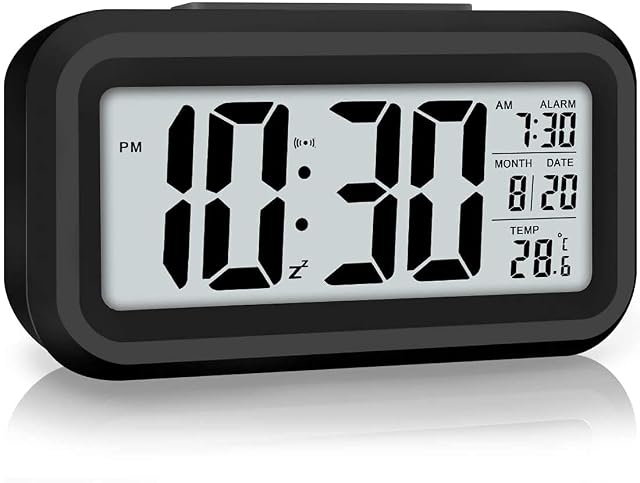
    Lesipee non-ticking LED digital desk clock with night light

    A non-ticking digital desk clock with a large LED display for time, temperature and date, an automatic ambient light sensor, and a snooze function.

    Amazon reference
    B0C814Y3SB (identical on 6 markets)
    EAN
    0768476014975
    • Explicitly non-ticking movement — a genuine silent-clock claim, not just a design assumption
    • Large, bright LED display shows time (12h/24h), temperature and date
    • Runs on 3 AAA batteries, not included

    Best for: A quiet home office where an audibly ticking clock would be a genuine distraction.
    Check price on Amazon
  2. Goxiry RGB LED mirror alarm clock with colour display

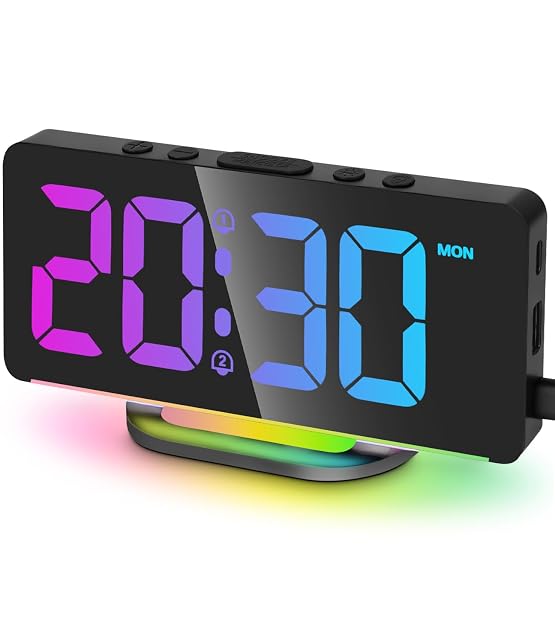
    Goxiry RGB LED mirror alarm clock with USB charging

    A 7-inch LED mirror alarm clock offering 10 RGB colours and 4 brightness levels, dual alarms, and 2 USB ports for charging other devices.

    Amazon reference
    B0DZHRR2JP (identical on 5 markets)
    EAN
    0611624871473
    • 10 RGB colour options and 4 brightness levels for display customisation
    • 7-inch display is large and easy to read, including for those with reduced vision
    • Plugs into mains power rather than running on battery alone (backup battery for memory only)

    Best for: Someone who wants a large, easy-to-read display with colour customisation and built-in USB charging.

    Check price on Amazon

Who each type suits

Working in sessions
A visible clock helps you hold blocks of time without opening a screen. A more useful habit than it sounds.
Video calls
A clock in your field of view saves looking elsewhere to check the time, which shows on camera.
Alarm and timer
Combined models also serve as a session timer. The most frequent secondary use.

The trade-offs to weigh

Bright display against distraction
A very bright display is visible from far off and draws the eye constantly. A brightness setting or a discreet display is preferable.
Analogue against digital
Analogue gives a perception of time passing; digital gives an exact value. Two different uses.
Multiple functions against legibility
Temperature, humidity, date and alarms clutter the display. A clock that shows only the time is read at a glance.

Questions buyers ask

Why a clock on a desk covered in screens?

Looking at the time on a screen exposes you to a notification, a message or a tab. A dedicated clock avoids that pull.

Analogue or digital?

Analogue makes you perceive the time elapsed; digital gives the exact time. For working in sessions, analogue often speaks more clearly.

Should the display be bright?

Too bright a display draws the eye constantly and is a nuisance in the evening. A brightness setting is a real criterion.

Do I want extra functions?

Temperature and humidity clutter the display. A clock showing only the time is read faster.

Battery or mains?

A battery lets you put it where you like and is forgotten until it dies. Mains adds a cable to an already loaded desk.

Does a clock set itself?

Radio-controlled models set themselves automatically, including the clock changes. A real comfort.

Where should it go?

In peripheral vision, not in the centre. A clock too prominently placed becomes a distraction.

What to remember

A dedicated clock exists so you do not check the time on a screen, where you always find something else. Put it in peripheral vision rather than centrally, and be wary of bright displays that draw the eye constantly.