Skip to content

The best document holders for 2026

A page lying flat on the desk forces the eyes and neck to repeatedly drop down and refocus between screen and paper; a holder that clips beside the monitor, at roughly the same distance and angle as the screen, keeps both in the same sightline. We compare monitor-side clip mounting against freestanding desk stands, adjustable line-guide or ruler features useful for data entry work, and page capacity for anyone working from multi-page documents rather than a single sheet.

What we recommend

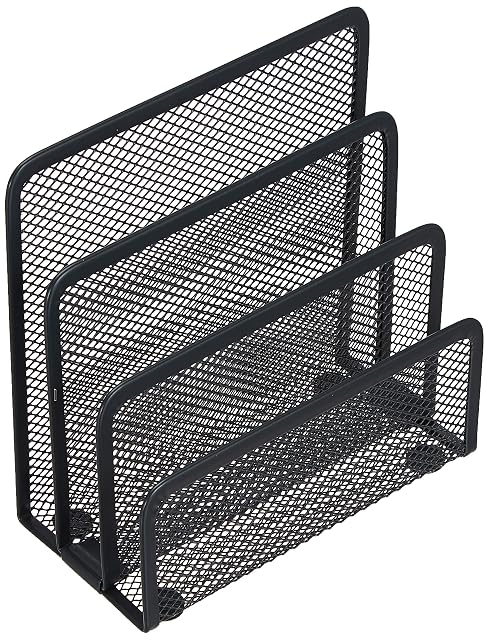
  1. Zeller Present 3-tier steel mesh letter tray

    Zeller Present 3-tier steel mesh letter tray

    A compact 3-tier steel wire mesh letter tray with compartments of different heights, for sorting loose documents on a desk corner.

    Amazon reference
    B00K5NR0G4 (identical on 6 markets)
    EAN
    4003368177328
    • Well-built steel mesh construction
    • Three compartments of different heights for basic sorting
    • A sorting tray for loose papers, not an inline document holder for active reading while typing

    Best for: A compact desk corner needing basic paper sorting rather than a full document-reading stand.
    Check price on Amazon
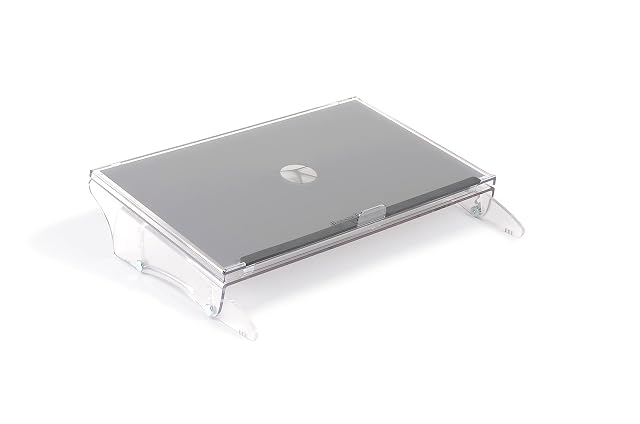
  2. BakkerElkhuizen FlexDesk 640 document holder beside a monitor

    BakkerElkhuizen adjustable inline document holder

    An adjustable inline document holder from ergonomics specialist BakkerElkhuizen, with 3 height levels, an anti-glare 51.5×38cm surface, and a 5kg capacity.

    Amazon reference
    B00167WZ7M (identical on 6 markets)
    EAN
    0012304893813
    • From BakkerElkhuizen, a manufacturer specialising specifically in ergonomic office equipment
    • Three height levels (11–18cm) for finding a personal ideal position
    • By far the highest price in this hub

    Best for: Anyone who regularly works from paper documents alongside a screen and wants a holder from a dedicated ergonomics manufacturer.

    Check price on Amazon

Who each type suits

Data entry
The aisle's historic use: reading a document and typing without switching between up and down constantly.
Study and long reading
A sloped stand puts the document in the same visual plane as the screen. That is what removes the neck's back-and-forth.
Small desk
A document holder occupies a permanent surface. Models that clip to the screen avoid that entirely.

The trade-offs to weigh

Side position against central position
A side holder makes you turn your head; a holder between keyboard and screen keeps the neck straight and takes the keyboard's space.
Screen clip against free-standing stand
The clip takes no space and accepts only a few sheets; the stand holds a book and occupies the desk.
Adjustable slope against stability
A steeply sloped stand reads better and lets the sheets slide. A retaining bar settles the problem.

Questions buyers ask

Where should a document holder go?

Between the keyboard and the screen rather than to one side. A side holder makes you turn your head at every line.

Does a stand suit a book?

Models with a retaining bar hold the pages of an open book. A screen clip accepts only loose sheets.

What slope should I choose?

Enough for the document to be in the same visual plane as the screen. Too steep and the sheets slide.

Does the holder take the keyboard's place?

In the central position, yes, on thick models. Flat holders slide under the keyboard at rest.

Is a screen clip stable?

With a few sheets, yes. A thick document tips it and loads the edge of the panel.

Do I need dedicated lighting?

A document lit only by the screen reads badly. A task lamp usefully completes it.

Does it really change anything?

On a long read, the neck fatigue drops distinctly. On a document consulted for two minutes, the contribution is marginal.

What to remember

The document holder goes between the keyboard and the screen, not to one side: a side holder makes you turn your head at every line. Aim for the same visual plane as the screen, and plan for lighting — the panel's light is not enough to read paper by.