Skip to content

The best webcams and webcam mounts for 2026

A laptop's built-in camera sits below eye level on most setups, angled slightly upward — an external webcam clipped to the top of an external monitor corrects that framing on its own, independent of the camera's resolution. We compare resolution and low-light performance, field of view (wider is not always better once a second person or a whiteboard needs to stay out of frame), and clip mount compatibility with increasingly thin modern monitor bezels.

What we recommend

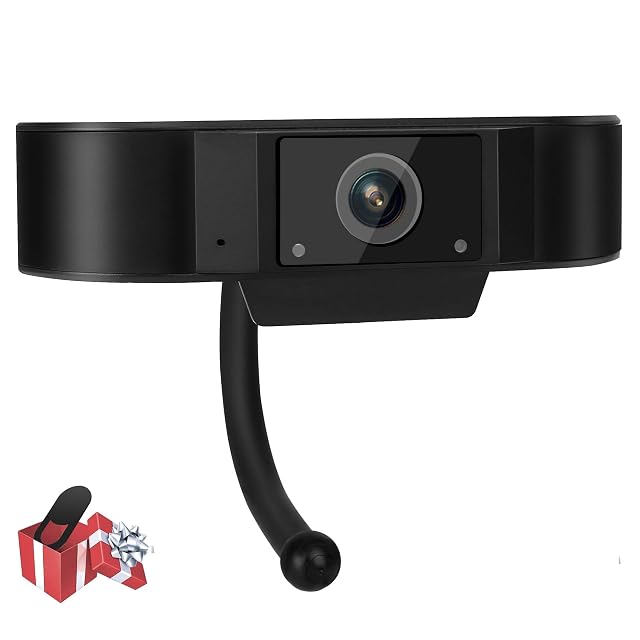
  1. WIWACAM 1080P webcam mounted on a monitor

    WIWACAM plug-and-play 1080P webcam with noise-reducing mic

    A budget plug-and-play 1080P webcam with a 6-layer glass lens, automatic exposure correction, and a digital microphone with automatic noise reduction.

    Amazon reference
    B08T5QYTLX (identical on 5 markets)
    EAN
    0700362326830
    • 1080P Full HD resolution with a 6-layer glass lens for image clarity
    • Automatic exposure correction adjusts to changing light
    • No stated autofocus, unlike the pricier webcam in this hub

    Best for: A no-fuss, budget webcam for general video calls without needing driver installation.
    Check price on Amazon
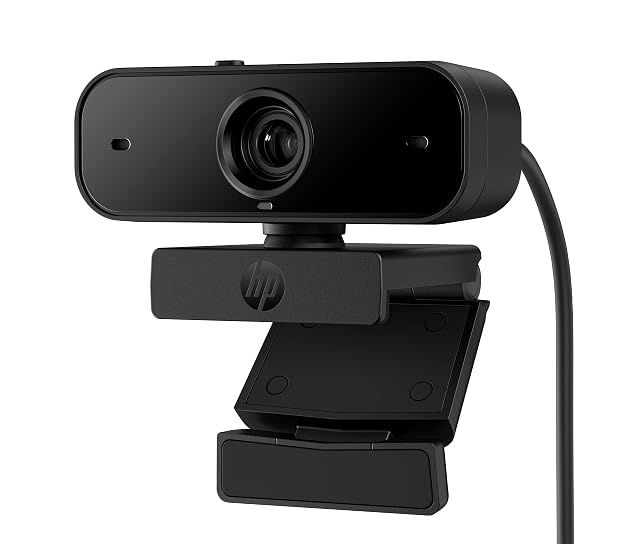
  2. HP 1080P webcam with privacy shutter mounted on a monitor

    HP 1080P autofocus webcam with privacy shutter

    A Full HD webcam with autofocus, dual noise-reducing microphones, 360° pan with 15° tilt, and a built-in privacy shutter for use between calls.

    Amazon reference
    B0CJQC6WW9 (identical on 5 markets)
    EAN
    0197029546845
    • Autofocus keeps the image sharp as you move, unlike fixed-focus budget webcams
    • Automatic exposure and colour correction for a more natural picture
    • Roughly five times the price of the budget webcam in this hub

    Best for: Frequent video calls where image sharpness, dual-mic clarity and a physical privacy shutter all matter.

    Check price on Amazon

Who each type suits

Daily video calls
Light counts for more than the camera: a source in front of the face transforms the image from a modest webcam.
Camera height
A camera set below the screen films from underneath. Placing it at eye height is the most effective adjustment.
Privacy
A physical shutter is the only visible guarantee that the camera is not filming. A simple, concrete criterion.

The trade-offs to weigh

Resolution against sensor
A high resolution on a small sensor is noisy in low light. A clean image at a modest resolution beats a noisy one in high definition.
Wide angle against background
A wide field shows the whole room; a narrow field frames the face. Wide angle is rarely desirable on a video call.
Built-in mount against tripod
The supplied clip sits on the screen and fixes the height; a tripod places the camera where you want and takes desk space.

Questions buyers ask

Is resolution the main criterion?

No: the sensor's behaviour in low light counts for more. A noisy image in high definition is worse than a clean one at a modest resolution.

How do I improve my image?

A light source in front of the face, never behind. That changes the most, before any change of equipment.

At what height should the camera go?

At eye height, above the screen. Set below, it films from underneath.

Do I want a privacy shutter?

It is the only visible guarantee that no image is being captured. A piece of tape does the same job less elegantly.

Does a smartphone replace a webcam?

Its sensor is often better, and you need a mount and an app. A valid solution, but less immediate.

Is wide angle useful?

It shows the whole room behind you, which is rarely desirable. A narrower field frames the face.

Does autofocus matter?

It avoids blur as you move and can hunt for focus continuously. Fixed focus is sometimes more stable.

What to remember

Light in front of the face changes the image more than any change of camera. Put the webcam at eye height — below, it films from underneath — and be wary of wide angle, which shows the whole room behind you.