Skip to content

The best dual monitor mounts for 2026

A shared crossbar mount holds two screens at a fixed relationship to each other, where independently adjustable arms let one monitor angle toward a second person or a different task without moving the other — a real difference for anyone who occasionally shares a screen or switches between a wide layout and a stacked one. We compare arm independence, combined weight capacity across both screens rather than one, and stacked (vertical) against side-by-side configurations.

What we recommend

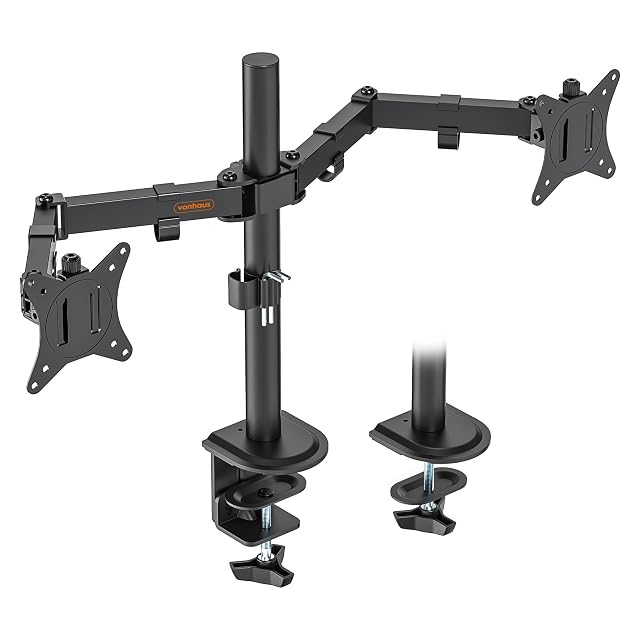
  1. VonHaus steel dual monitor mount holding two screens

    VonHaus steel dual monitor desk mount, 13–32"

    A steel dual monitor mount for 13 to 32-inch screens, adjustable in height, tilt and rotation, compatible with VESA 75×75 and 100×100 patterns.

    Amazon reference
    B076QGMJBY (identical on 6 markets)
    EAN
    5056115705144
    • Durable steel construction with a generous stated maximum load capacity
    • Height-adjustable and tilts up to 90°
    • The specific weight range per arm is not detailed as precisely as the pricier competitor in this hub

    Best for: A budget entry into dual-monitor mounting, backed by an unusually long manufacturer guarantee.
    Check price on Amazon
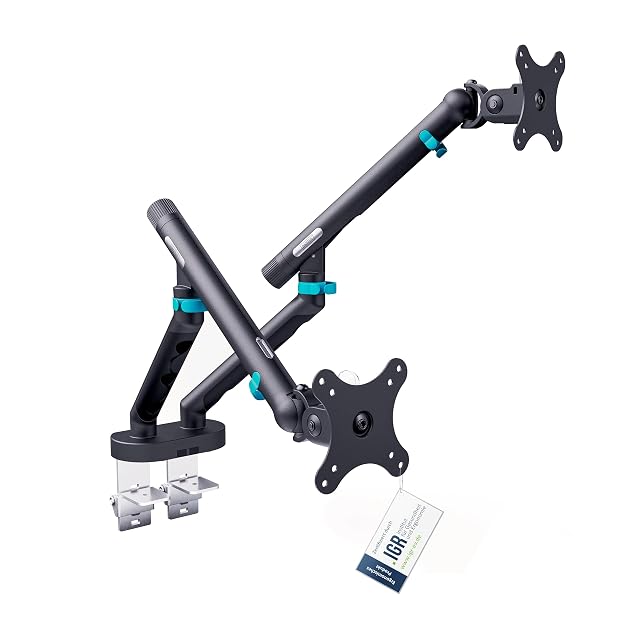
  2. DIGITUS dual monitor mount holding two large screens

    DIGITUS spring-adjustable dual monitor mount, up to 35"

    A top-tier dual monitor mount supporting flat or curved screens up to 35 inches and 10kg each, with tool-free spring tension adjustment and VESA quick-release plates.

    Amazon reference
    B0GMPWRXZQ (identical on 6 markets)
    EAN
    4016032505891
    • Compatible with flat and curved monitors up to 35 inches and 10kg each — the highest capacity in this hub
    • Tool-free spring tension adjustment with a built-in target-weight indicator
    • The highest price in this hub

    Best for: Large or curved monitors, or a desk shared between people who need to reposition screens independently and often.

    Check price on Amazon

Who each type suits

Two identical screens
The case these mounts are designed for. Two screens of different sizes align badly on a shared bar.
V configuration
Two screens angled slightly towards the user reduce neck rotation. The real ergonomic benefit of a dual setup.
Independent adjustment
Two separate arms are each set to their own height. A dual mount imposes a shared geometry, which is awkward with different screens.

The trade-offs to weigh

Dual mount against two separate arms
The dual mount costs less and takes a single fixing; two independent arms adjust separately and take two anchor points.
Combined load against the desktop
Two screens on a single clamp load the top heavily. Thin chipboard can mark, or even give way.
Reach against stability
The longer the arms, the more the assembly transmits vibration and flexes. Two screens amplify what a single arm already did.

Questions buyers ask

Two separate arms or one dual mount?

The dual mount costs less and imposes a shared geometry; two arms adjust independently, which counts with different screens.

Will the desk take two screens?

The combined load on a single clamp is substantial. A thin chipboard top can mark or give way: a grommet mount spreads it better.

How should two screens be positioned?

In a slight V towards the user, panel tops aligned. The main screen facing you, the second to the side.

Do the screens have to be identical?

Two models of the same size align naturally. Different sizes call for independent adjustment.

The assembly sags — what do I do?

Check the spring tension and bring the screens closer to the post. A long loaded arm always flexes more.

Can one screen go above the other?

It is possible on some mounts and it puts the second screen outside the comfortable field of view. Side by side is preferable.

How many cables should I allow for?

Two video cables and two power leads at minimum. The length must cover the arms' full reach.

What to remember

Two screens on a single clamp load the desktop heavily: a grommet mount spreads it better than a clamp on thin chipboard. Align the panel tops in a slight V, and prefer side by side to stacking, which puts the second screen outside the comfortable field of view.