Skip to content

The best desk USB hubs and docking stations for 2026

A bus-powered hub draws all its power and data bandwidth from the single upstream port, which can slow down or destabilise several devices used at once — a separately powered hub avoids that bottleneck for anything beyond charging a phone and reading a flash drive. We compare powered against bus-powered design, the actual port mix (USB-C, USB-A, HDMI, ethernet) against what a specific desk setup needs, and stated data transfer speed for the ports actually used daily.

What we recommend

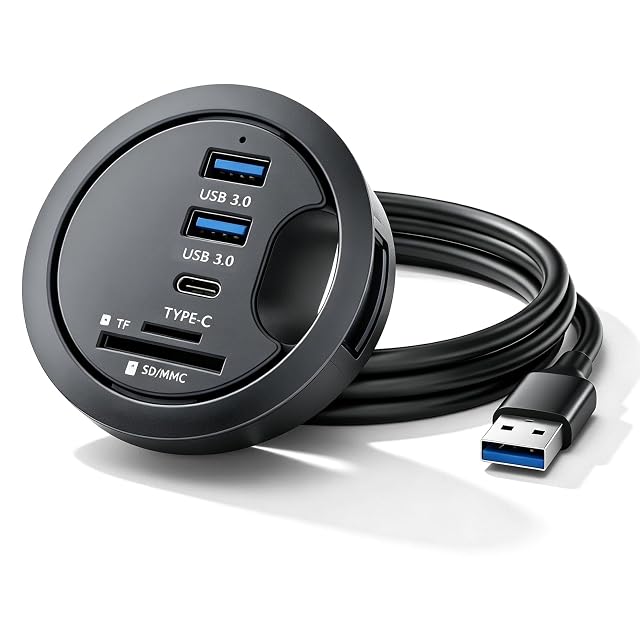
  1. Leikurvo USB hub mounted flush in a desk grommet hole

    Leikurvo in-desk USB hub for 60mm grommet holes

    A USB hub that mounts directly into a standard 60mm desk grommet hole, providing 2 USB 3.0 ports, a USB-C port, and SD/TF card readers flush with the desktop.

    Amazon reference
    B0GZP29X5S (identical on 6 markets)
    EAN
    0725380519378
    • Mounts flush into the desk's existing 60mm grommet hole rather than sitting on top of the desk
    • 2 USB 3.0 ports, 1 USB-C port, plus SD and TF card readers in one unit
    • Requires an existing grommet hole of the right size — not usable on a desk without one

    Best for: A desk that already has a standard 60mm cable grommet hole and no permanent hub installed in it.
    Check price on Amazon
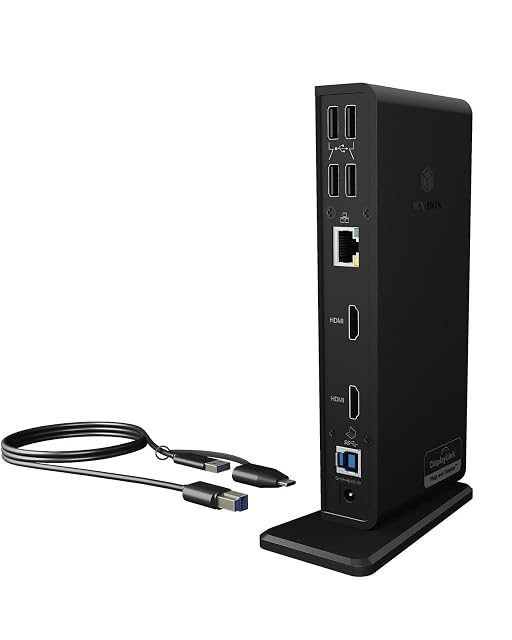
  2. ICY BOX docking station connected to two monitors

    ICY BOX DisplayLink docking station with dual HDMI

    A DisplayLink-powered docking station with dual 2K@60Hz HDMI outputs, a combined USB Type-C/Type-A cable, and flexible vertical or horizontal placement.

    Amazon reference
    B08B1M79ZV (identical on 6 markets)
    EAN
    4250078169765
    • Dual HDMI outputs at 2K@60Hz — enough to drive two additional external monitors from one dock
    • Combined USB Type-C/Type-A cable works with either connector type on a laptop
    • Requires installing the DisplayLink driver before use — not a plug-and-play device out of the box

    Best for: Driving two additional external monitors from a laptop that doesn't natively support that many displays.

    Check price on Amazon

Who each type suits

Laptop as a fixed workstation
The use that justifies a dock: one cable to plug in on arriving, one to unplug on leaving.
Several screens
The number of screens actually drivable depends on the laptop as much as on the dock. The most frequent source of disappointment.
Missing ports
A powered hub is enough to add USB ports. Video and network call for a dock.

The trade-offs to weigh

Powered hub against passive hub
A passive hub shares the host port's power and makes hungry peripherals drop out; a powered hub adds a brick and always works.
Dock against compatibility
The number of screens and the resolution depend on the laptop's capabilities, not just on the dock. The same dock does not give the same result on two machines.
Charging through the cable against separate power
Charging through a single cable simplifies everything and calls for enough power for the machine. A powerful laptop may charge slowly, or not at all.

Questions buyers ask

Why does my second screen not appear?

The number of drivable screens depends on the laptop's video capabilities, not just on the dock. The aisle's most frequent disappointment.

Do I need a powered hub?

As soon as you plug in hungry peripherals — drives, screens, charging. A passive hub shares the port's power and makes devices drop out.

Does the dock charge the computer?

If its output power covers the machine's need. A powerful laptop on a weak dock runs down while you work.

Why does my drive disconnect?

A lack of power on a passive hub, or a poor-quality cable. The two main causes.

Does the supplied cable matter?

A great deal: a non-compliant cable limits throughput, video and charging with no message to say so. An old cable looks identical to a recent one.

The dock gets warm — is that normal?

It converts and distributes power, so slight warmth is expected. Significant heat signals an excessive load.

Should it be unplugged when I leave?

That is exactly the point: one cable to pull. The dock stays powered and ready for your return.

What to remember

The number of drivable screens depends on the laptop as much as on the dock — the aisle's number-one disappointment. A passive hub makes hungry peripherals drop out, and a non-compliant cable limits throughput, video and charging without saying so.