Skip to content

The best desktop and clamp-mount power strips for 2026

A power strip clamped to the desk edge or mounted underneath keeps outlets within reach without a trailing strip taking up desk or floor space, which matters more on a standing desk where a floor-based strip has to account for height changes. We compare genuine surge protection rating, USB-C output wattage against what current laptops actually draw for a meaningful charge speed, and clamp-mount against freestanding base design.

What we recommend

  1. Maclean power strip mounting bracket under a desk

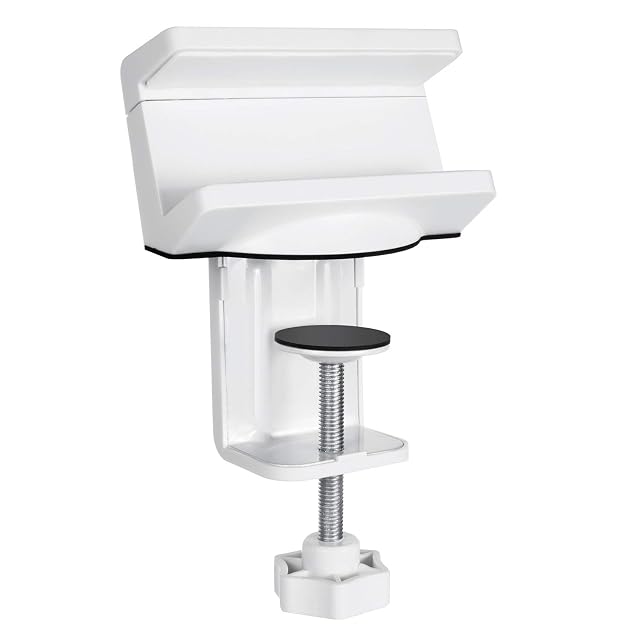
    Maclean clamp-mount power strip holder bracket

    A desk-clamp bracket that mounts an existing power strip (40 to 60mm wide) underneath the desk, with an integrated rear cable channel.

    Amazon reference
    B07NYYJVFL (identical on 6 markets)
    EAN
    5902211111658
    • Compatible with most power strips between 40 and 60mm wide
    • Quick desk-clamp mounting, no drilling
    • This is a mounting bracket for an existing power strip — it does not include the power strip itself

    Best for: Mounting an existing power strip out of sight, without buying a full cable tray.
    Check price on Amazon
  2. Ultimate Setup oversized under-desk cable and power basket

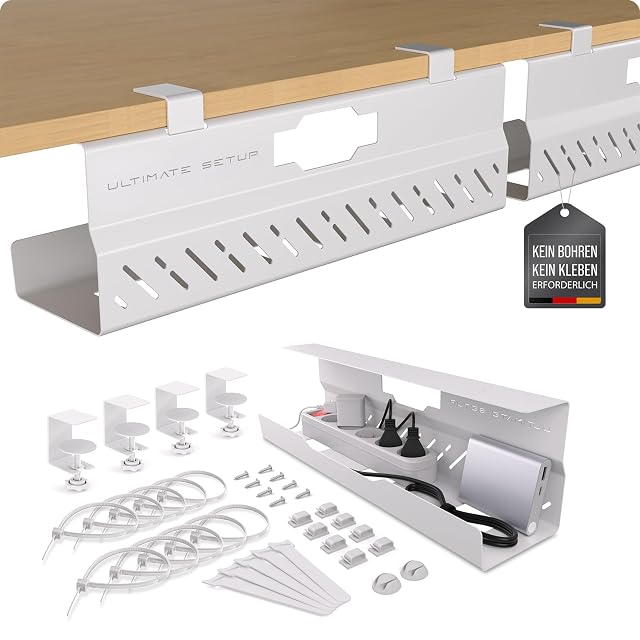
    Ultimate Setup oversized heavy-duty under-desk cable basket

    An oversized, heavy-duty cable and power supply basket with a metal frame rated to 8kg, no-drill padded clamp mounting, and included cable clips.

    Amazon reference
    B0DGQDZWW3 (identical on 6 markets)
    EAN
    4260762221006
    • Extra-large basket fits bulky plugs and power adapters that smaller trays cannot
    • Strong metal frame rated to 8kg per basket — the highest capacity cable holder in this hub
    • Larger size takes up more under-desk space than a compact bracket or tray

    Best for: A desk with several bulky power adapters and chargers, not just one or two thin cables.

    Check price on Amazon

Who each type suits

Fixed workstation
A strip fixed under the top tidies the power away with the cables. That is what makes the tidying last.
Sit-stand desk
A strip fixed under the top rises with it, which removes the strain on a single power cable. The right configuration.
Sensitive equipment
Surge protection shields screens and computer from a spike on the supply. It has a limited service life.

The trade-offs to weigh

Number of sockets against total load
A strip has an overall permissible load, not one per socket. Adding hungry appliances saturates it whatever the number of outlets.
Spaced sockets against compactness
Sockets close together stop you plugging several power bricks side by side. Spacing is a very concrete criterion.
Protection against service life
Surge protection wears with every spike absorbed and becomes a plain strip without saying so. A status indicator is useful.

Questions buyers ask

Can two strips be daisy-chained?

It is inadvisable: the total load stacks onto a single wall socket. A classic cause of overheating.

Does socket spacing matter?

Very much: wide power bricks occupy two positions on a strip with tight spacing. The aisle's most concrete criterion.

Does surge protection last?

It wears with every spike absorbed and stops protecting without saying so. A status indicator lets you know.

Do I want a strip with a switch?

It lets you cut the whole workstation with one movement. Per-socket switches avoid cutting the computer along with the rest.

Can it be fixed under the desk?

That is the tidiest configuration, and the only one that holds on an adjustable desk. Adhesive or screwed brackets exist for it.

Are the built-in USB ports useful?

They save bulky chargers and often deliver a modest power. Check whether fast charging matters to you.

The strip gets hot — is that serious?

Distinct heat signals the load being exceeded or a badly seated plug. Unplug and spread the load.

What to remember

The permissible load is overall, not per socket: the number of outlets says nothing about what you can plug in. Never daisy-chain two strips, check the spacing — wide bricks occupy two positions — and fix it under the top on an adjustable desk.